您现在的位置是:网站首页> 编程资料编程资料
Ajax实现异步刷新验证用户名是否已存在的具体方法_实用技巧_
 2023-05-24
352人已围观
2023-05-24
352人已围观
简介 Ajax实现异步刷新验证用户名是否已存在的具体方法_实用技巧_
都是简单的实例,所以直接发代码
静态页面Ajax.html
ajax
| 账号: | ||
| 密码: | ||
| 确认密码: | ||
| 姓名: |
在账号输入框失去焦点时调用函数
访问服务器使用的是Get方法,所以在参数处使用了附加随机码来避免缓存。
验证页面validate.aspx后台代码:
using System;
using System.Collections.Generic;
using System.Linq;
using System.Web;
using System.Web.UI;
using System.Web.UI.WebControls;
using System.Configuration;
using System.Data.Sql;
using System.Data.SqlClient;
public partial class Ajax_validate_validate : System.Web.UI.Page
{
public SqlConnection conn;
protected void Page_Load(object sender, EventArgs e)
{
Response.Clear();
if (Exists(Request.QueryString["account"]))
Response.Write("true");
else
Response.Write("false");
Response.End();
}
///
/// 获取数据库连接
///
///
protected SqlConnection GetConnection()
{
string str = ConfigurationManager.ConnectionStrings["ConnectionString"].ConnectionString;
conn = new SqlConnection(str);
return conn;
}
protected bool Exists(string account)
{
using (GetConnection())
{
try
{
conn.Open();
string sqlStr = "select count(*) from userinfo where account='" + account + "'";
SqlCommand cmd = new SqlCommand(sqlStr, conn);
int row = Convert.ToInt32(cmd.ExecuteScalar());
if (row > 0)
return true;
else
return false;
}
catch (Exception e)
{
throw e;
}
finally
{
conn.Close();
}
}
}
}
在后台中验证用户名是否已经存在于数据库中,返回真或者假
运行结果:
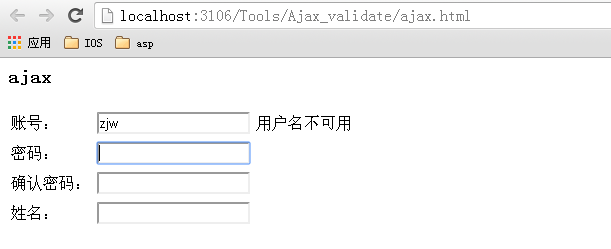
数据库很简单,只建了一张表userinfo,有3个字段:account、passwd、name
注意:在后台往请求页面写数据时,当写完要发送的数据之后,需要调用Response.end()方法来终止写入,否则可能会发送一个完整页面过去。
相关内容
- ASP.NET―001:GridView绑定List、页面返回值具体实现_实用技巧_
- 在.net中用CheckBoxList实现单选_实用技巧_
- .net中 发送邮件内容嵌入图片的具体实例_实用技巧_
- asp.net无法获取iis目录的问题解决方法_实用技巧_
- asp.net网站首页根据IP自动跳转指定页面的示例_实用技巧_
- asp.net querystring乱码解决方法_实用技巧_
- asp.net中利用Jquery+Ajax+Json实现无刷新分页的实例代码_实用技巧_
- asp.net操作ini文件示例_实用技巧_
- 使用ajax局部刷新gridview进行数据绑定示例_实用技巧_
- asp.net获取网站绝对路径示例_实用技巧_


