您现在的位置是:网站首页> 编程资料编程资料
详解.NET中的加密算法总结(自定义加密Helper类续)_实用技巧_
 2023-05-24
427人已围观
2023-05-24
427人已围观
简介 详解.NET中的加密算法总结(自定义加密Helper类续)_实用技巧_
1.1.1 摘要
相信许多人都使用过.NET提供的加密算法,而且在使用的过程我们必须了解每种加密算法的特点(对称或非对称,密钥长度和初始化向量等等)。我也看到过很多人写过.NET中加密算法总结,但我发现个别存在一些问题,很多人喜欢罗列每种加密算法的具体实现,假设我们要求实现AES和Triple DES加密算法,的确可以很多地分别给出它们的具体实现。
那我们真的有必要给出每个加密算法的具体实现吗?而且这样的设计不符合OOP设计思想,最重要的是我们要维护多个加密算法啊!OK接下来让我们实行一个可扩展和好维护的加密算法Helper。
1.1.2 正文
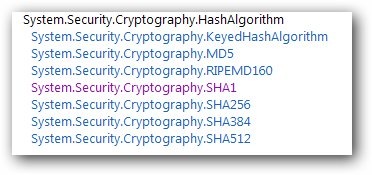
图1 Hash加密算法继承层次
从上面的继承层次我们可以知道.NET中提供七种Hash加密算法,它们都继承于抽象类HashAlgorithm,而且我们经常使用MD5,SHA1和SHA256等加密算法。下面我们将给出MD5和SHA1的实现。
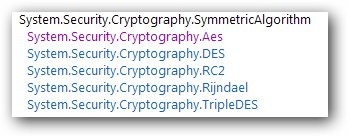
图2 对称加密算法继承层次
从上面的继承层次我们可以知道.NET中提供五种对称加密算法,它们都继承于抽象类SymmetricAlgorithm,下面我们将给出它们的通用实现。

图3 非对称加密算法继承层次
从上面的继承层次我们可以知道.NET中提供四种非对称加密算法,它们都继承于抽象类AsymmetricAlgorithm,下面我们将给出RSA实现。
除了以上加密算法,.NET还提供了很多其他类型的加密,这里我们主要介绍一些常用的加密算法,如果大家需要了解的话可以查阅MSDN。OK接下来让我们给出Hash加密算法的实现吧。
Hash加密算法
在给出具体的算法实现之前,首先让我们回忆一下什么是Hash加密算法?
Hash加密是通过使用hash函数对要加密的信息进行加密,然后生成相应的哈希值,那么我们可以定义一个hash()函数,要加密的信息m和加密后的哈希值h。

我们对信息m1和m2进行hash加密,就可以获取相应哈希值hash(m1)和hash(m2)。

如果信息m1=m2那么,那么将得到同一的哈希地址,但是信息m1!=m2也可能得到同一哈希地址,那么就发生了哈希冲突(collision),在一般的情况下,哈希冲突只能尽可能地减少,而不能完全避免。当发生哈希冲突时,我们要使用冲突解决方法,而主要的冲突解决方法:开放地址法、再哈希法、链地址法和建立一个公共溢出区。
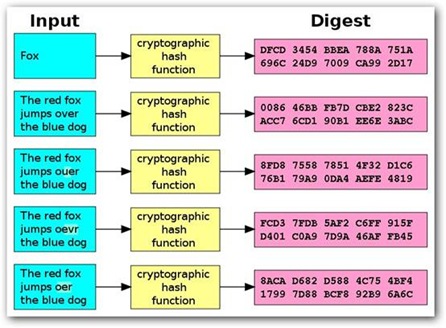
图4 Hash加密过程(图片来源wiki)
现在让我们来实现通用的hash加密方法。
////// Encrypts the specified hash algorithm. /// 1. Generates a cryptographic Hash Key for the provided text data. /// /// The hash algorithm. /// The data to hash. ///public static string Encrypt(HashAlgorithm hashAlgorithm, string dataToHash) { var tabStringHex = new string[16]; var UTF8 = new System.Text.UTF8Encoding(); byte[] data = UTF8.GetBytes(dataToHash); byte[] result = hashAlgorithm.ComputeHash(data); var hexResult = new StringBuilder(result.Length); for (int i = 0; i < result.Length; i++) { //// Convert to hexadecimal hexResult.Append(result[i].ToString("X2")); } return hexResult.ToString(); }
上面的加密方法包含一个HashAlgorithm类型的参数,我们可以传递继承于抽象类HashAlgorithm的具体hash算法(MD5,SHA1和SHA256等),通过继承多态性我们使得加密方法更加灵活、简单,最重要的是现在我们只需维护一个通用的加密方法就OK了。
接着我们要添加判断加密后哈希值是否相等的方法,判断哈希值是否相等的方法IsHashMatch()方法。
////// Determines whether [is hash match] [the specified hash algorithm]. /// /// The hash algorithm. /// The hashed text. /// The unhashed text. ////// public static bool IsHashMatch(HashAlgorithm hashAlgorithm, string hashedText, string unhashedText) { string hashedTextToCompare = Encrypt( hashAlgorithm, unhashedText); return (String.Compare(hashedText, hashedTextToCompare, false) == 0); }true if [is hash match] [the specified hash algorithm]; /// otherwise,false . ///
对称加密算法
现在我们完成了通用的Hash加密方法了,接下来我们继续介绍对称和非对称算法。
在实现对称加密算法之前,先让我们了解一下对称加密的过程,假设我们有一组数据要加密那么我们可以使用一个或一组密钥对数据进行加密解密,但存在一个问题对称加密算法的密钥长度不尽相同,如DES的密钥长度为64 bit,而AES的长度可以为128bit、192bit或256 bit,难道要我们hard code每种算法的密钥长度吗?能不能动态地产生对应算法的密钥呢?
其实.NET已经提供我们根据不同的对称算法生成对应密钥的方法了,并且把这些方法都封装在PasswordDeriveBytes和Rfc2898DeriveBytes类中。
首先让我们看一下PasswordDeriveBytes类包含两个方法CryptDeriveKey和GetBytes用来产生对应算法的密钥,现在让我们看一下它们如何产生密钥。
CryptDeriveKey:
// The sample function. public void Encrypt() { // The size of the IV property must be the same as the BlockSize property. // Due to the RC2 block size is 64 bytes, so iv size also is 64 bytes. var iv = new byte[] { 8, 7, 6, 5, 4, 3, 2, 1 }; var pdb = new PasswordDeriveBytes("pwd", null); // Set the encrypted algorithm and export key algorithm. // Then get the key base on encrypt algorithm. byte[] key = pdb.CryptDeriveKey("RC2", "SHA1", 128, iv); Console.WriteLine(key.Length * 8); Console.WriteLine(new RC2CryptoServiceProvider().BlockSize); // Creates an RC2 object to encrypt with the derived key var rc2 = new RC2CryptoServiceProvider { Key = key, IV = new byte[] { 21, 22, 23, 24, 25, 26, 27, 28 } }; // now encrypt with it byte[] plaintext = Encoding.UTF8.GetBytes("NeedToEncryptData"); using (var ms = new MemoryStream()) { var cs = new CryptoStream( ms, rc2.CreateEncryptor(), CryptoStreamMode.Write); cs.Write(plaintext, 0, plaintext.Length); cs.Close(); byte[] encrypted = ms.ToArray(); } } 示意例子一:我们使用SHA1哈希算法为RC2加密算法生成128bit的密钥,这样我们就可以根据不同对称加密算法获取相应长度的密钥了,注意我们并没用动态地生成初始化向量iv,这是为了简单起见实际中不应该这样获取初始化向量。
接下来让我们看一下通过PBKDF1和PBKDF2s算法生成密钥的实现。
PBKDF1
GetBytes:PasswordDeriveBytes的GetBytes()方法实现了PBKDF1(Password Based Key Derivation Function)。
PBKDF1算法过程:
1.拼接密钥和盐:R0 = Pwd + Salt
2.哈希加密过程:R1 = Hash(R2-1)
……..
3.哈希加密过程:Rn = Hash(Rn - 1)
4.n是迭代的次数(参考PBKDF1规范请点这里)
现在我们对PBKDF1算法的原理有了初步的了解,接下来我们将通过GetBytes()调用该算法生成密钥。
////// Uses the PBKDF1 to genernate key, /// then use it to encrypt plain text. /// public void PBKDF1() { byte[] salt = new byte[] { 8, 7, 6, 5, 4, 3, 2, 1 }; // Creates an RC2 object to encrypt with the derived key var pdb = new PasswordDeriveBytes("pwd", salt) {IterationCount = 23, HashName = "SHA1"}; // Gets the key and iv. byte[] key = pdb.GetBytes(16); byte[] iv = pdb.GetBytes(8); var rc2 = new RC2CryptoServiceProvider { Key = key, IV = iv }; byte[] plaintext = Encoding.UTF8.GetBytes("NeedToEncryptData"); using (var ms = new MemoryStream()) { // Encrypts data. var cs = new CryptoStream( ms, rc2.CreateEncryptor(), CryptoStreamMode.Write); cs.Write(plaintext, 0, plaintext.Length); cs.Close(); byte[] encrypted = ms.ToArray(); } }
示意例子二:我们使用PBKDF1算法为RC2加密算法生成128 bit的密钥和64 bit的初始化向量,要注意的是PasswordDeriveBytes的GetBytes()方法已经过时了,而它的替代项就是接下来要介绍的Rfc2898DeriveBytes的GetBytes()方法。
PBKDF2
GetBytes:由于Rfc2898DeriveBytes的GetBytes()方法实现了PBKDF2算法,而且它也替代了PBKDF1过时的GetBytes()方法,所以我们推荐使用Rfc2898DeriveBytes的GetBytes()方法。
////// Uses the PBKDF2 to genernate key, /// then use it to encrypt plain text. /// public void PBKDF2() { byte[] salt = new byte[] { 23, 21, 32, 33, 46, 59, 60, 74 }; var rfc = new Rfc2898DeriveBytes("pwd", salt, 23); // generate key and iv. byte[] key = rfc.GetBytes(16); byte[] iv = rfc.GetBytes(8); // Creates an RC2 object to encrypt with the derived key var rc2 = new RC2CryptoServiceProvider { Key = key, IV = iv }; // Encrypts the data. byte[] plaintext = Encoding.UTF8.GetBytes("NeedToEncryptData"); using (var ms = new MemoryStream()) { var cs = new CryptoStream( ms, rc2.CreateEncryptor(), CryptoStreamMode.Write); cs.Write(plaintext, 0, plaintext.Length); cs.Close(); byte[] encrypted = ms.ToArray(); } }
示意例子三:我们发现PBKDF2()方法和之前的PBKDF1()方法没有什么区别,就是无需指定加密密钥的哈希算法(参考PBKDF2规范请点这里)。
前面通过三种方法来动态的生成加密密钥,而且我们将使用Rfc2898DeriveBytes的GetBytes()方法来获取密钥,那么接下来让我们使用该方法实现通用的对称加密算法吧!

图5 对称算法加密过程
首先我们对加密的平文进行编码,这里默认使用UTF8对平文进行编码,也可以使用其他编码方式,接着使用相应加密算法对编码后的平文进行加密,最后把加密后的Byte数组转换为Base64格式字符串返回。
////// Encrypts with specified symmetric algorithm. /// Can be Aes, DES, RC2, Rijndael and TripleDES. /// /// The symmertric algorithm (Aes, DES, RC2, Rijndael and TripleDES). /// The plain text need to be encrypted. /// The secret key to encrypt plain text. /// The iv should be 16 bytes. /// Salt to encrypt with. /// The number of iterations for plain text. /// Size of the key. /// The cipher mode. /// The padding mode. ///public static byte[] Encrypt(SymmetricAlgorithm algorithm, byte[] plainText, string key, string iv, string salt, int pwdIterations, int keySize, CipherMode cipherMode, PaddingMode paddingMode) { if (null == plainText) throw new ArgumentNullException("plainText"); if (null == algorithm) throw new ArgumentNullException("algorithm"); if (String.IsNullOrEmpty(key)) throw new ArgumentNullException("key"); if (String.IsNullOrEmpty(iv)) throw new Argumen
相关内容
- 详解ASP.NET MVC下的异步Action的定义和执行原理_实用技巧_
- 详解在.net中读写config文件的各种方法_实用技巧_
- 解决ASP.NET中的各种乱码问题总结_实用技巧_
- ASP.NET Core 导入导出Excel xlsx 文件实例_实用技巧_
- asp.net分页控件使用详解【附实例下载】_实用技巧_
- asp.net创建事务的方法_ASP.NET_
- 详解.NET中使用Redis数据库_实用技巧_
- 详解开源免费且稳定实用的.NET PDF打印组件itextSharp(.NET组件介绍之八)_实用技巧_
- 详解一款开源免费的.NET文档操作组件DocX(.NET组件介绍之一)_实用技巧_
- 详解ASP.NET 生成二维码实例(采用ThoughtWorks.QRCode和QrCode.Net两种方式)_实用技巧_
点击排行
本栏推荐


